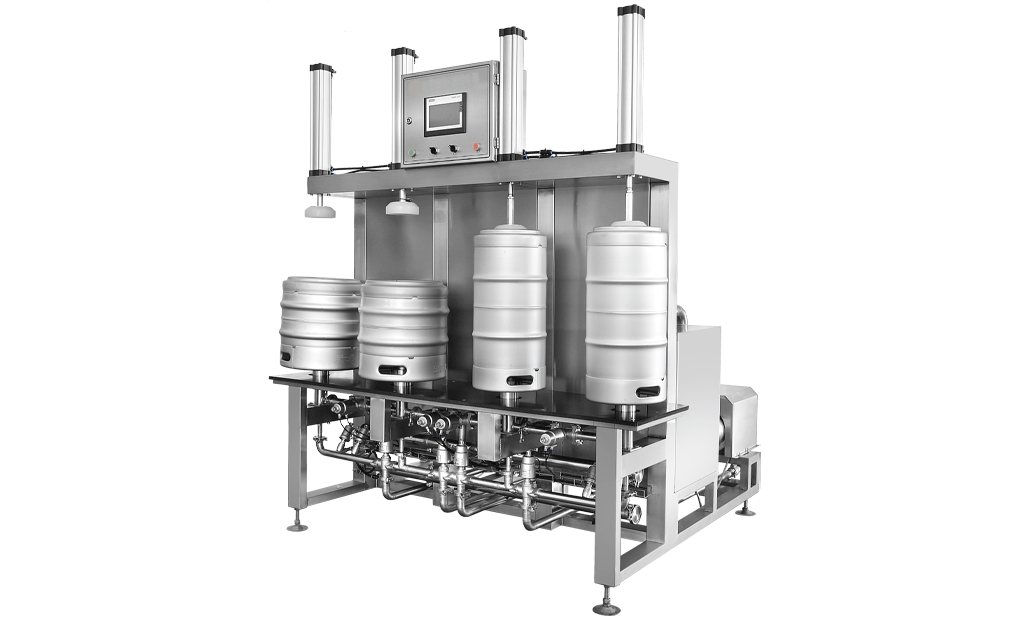
Excessive foam, inconsistent filling volumes, abnormal pressure readings and reduced production speed can affect both packaging quality and operating efficiency during beer canning.
This guide covers six common beer can filling machine troubleshooting and practical checks to help operators identify possible causes and determine the next steps. Settings specific to certain machine models are addressed separately to help prevent incorrect adjustments.
Part 1: Pressure Does Not Return to Zero
If the machine still displays approximately 4–5 kPa before filling or after filling is completed, the issue may be related to the exhaust system or pressure sensor.
Check the following:
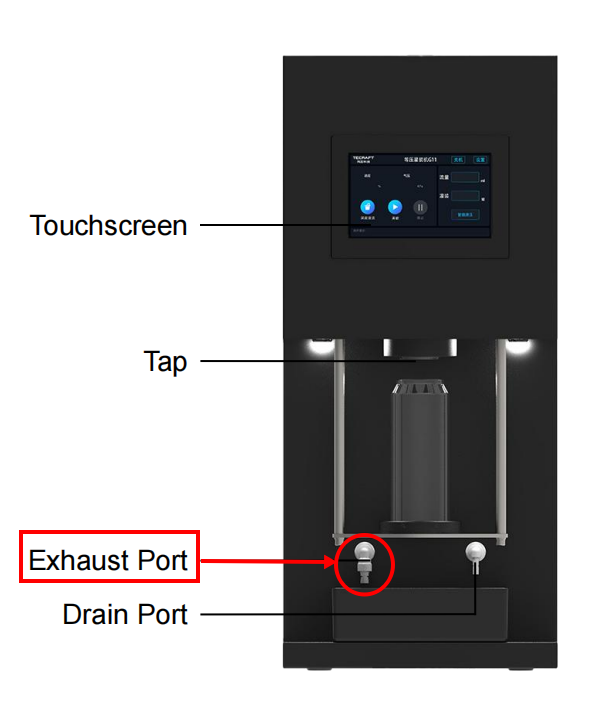
- Exhaust nozzle: Check for blockages caused by beer residue, foam or debris.
- Exhaust solenoid valve: Confirm that the valve operates correctly.
- Exhaust passage: Inspect for blockages or restricted airflow.
- Pressure sensor: If the exhaust system is functioning normally but the reading remains abnormal, inspect the sensor and its connections.
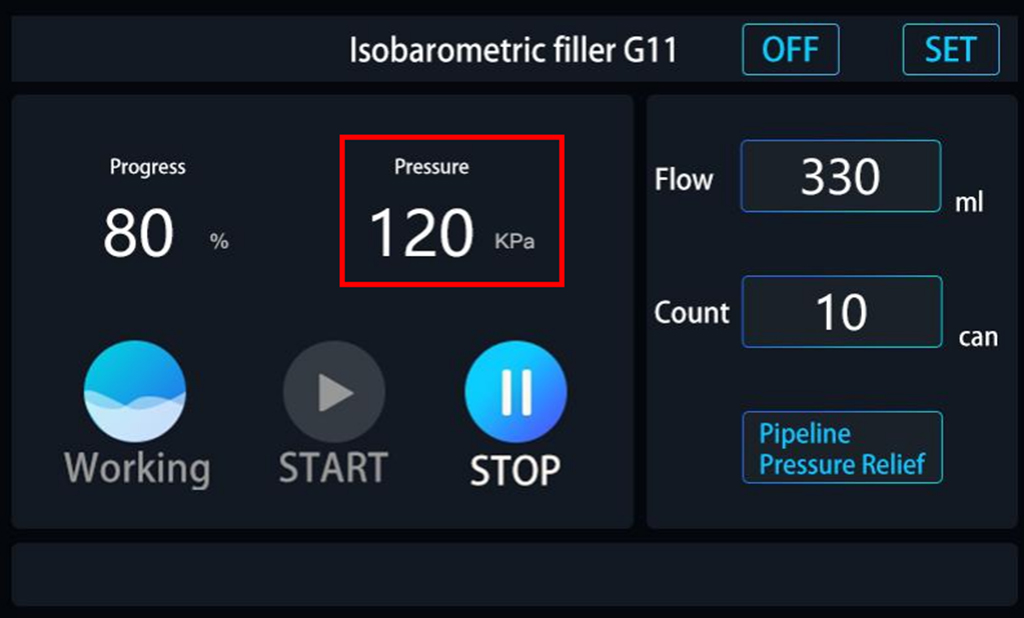
Start with common issues such as nozzle blockages before checking electrical components. Before inspecting or removing parts, stop the machine and release residual pressure according to the operating manual.
Part 2: Filling Progress Reaches 100% Too Early
If the displayed filling progress reaches 100% before filling is actually complete, the cause may be an abnormal sensor signal or an incomplete machine reset.
Check the sensor position, connections and operating condition. Reset the machine according to the operating instructions, then use a suitable test container to compare the displayed progress with the actual filling process.
If the issue continues, record the filling stage and displayed status when it occurs to support further troubleshooting.
Part 3: Excessive Foam or Insufficient Filling
Excessive foam and underfilling may occur together, but they do not necessarily have the same cause. Beer temperature, CO₂ pressure, nozzle condition, piping and machine settings can all affect filling performance.
Check the following:
- Beer temperature: Higher temperatures can increase CO₂ release and lead to more foam.
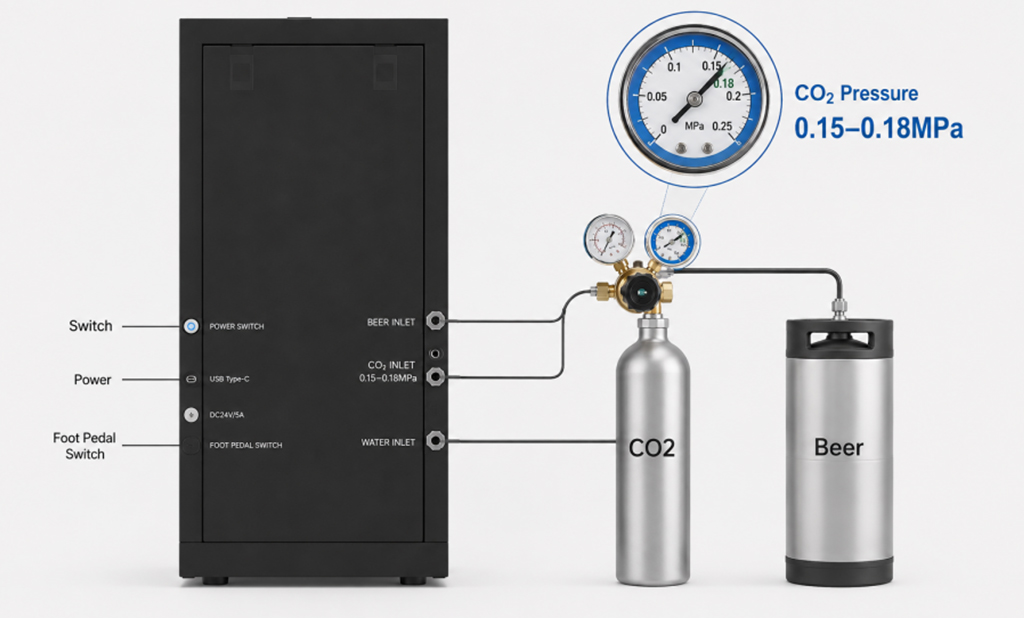
- CO₂ Supply: Ensure a stable supply with a working pressure of 0.15–0.18 MPa, meeting the machine’s requirements.
- Filling nozzle: Ensure that the nozzle is clean, unobstructed and suitable for the product.
- Beer lines: Check the connections and look for significant temperature increases during operation.
- Machine settings: Confirm that the current settings match the beer type and filling conditions.
Reference Settings for SDET G11/G21 Models
The following values apply only to the relevant SDET G11/G21 models and should not be applied directly to other models or brands. Confirm all settings against the relevant machine manual, software version and technical guidance.
- Foam: Reference value 30.
- Stability Time: Reference value 8 seconds.
- Sealing: Reference value 400. Confirm the parameter definition and permitted range before adjusting.
- Air: Reference value 2. Refer to the relevant machine manual for its exact function.
- Flow Deduction: Reference value 35. Keep the original setting initially and assess the need for adjustment through testing.
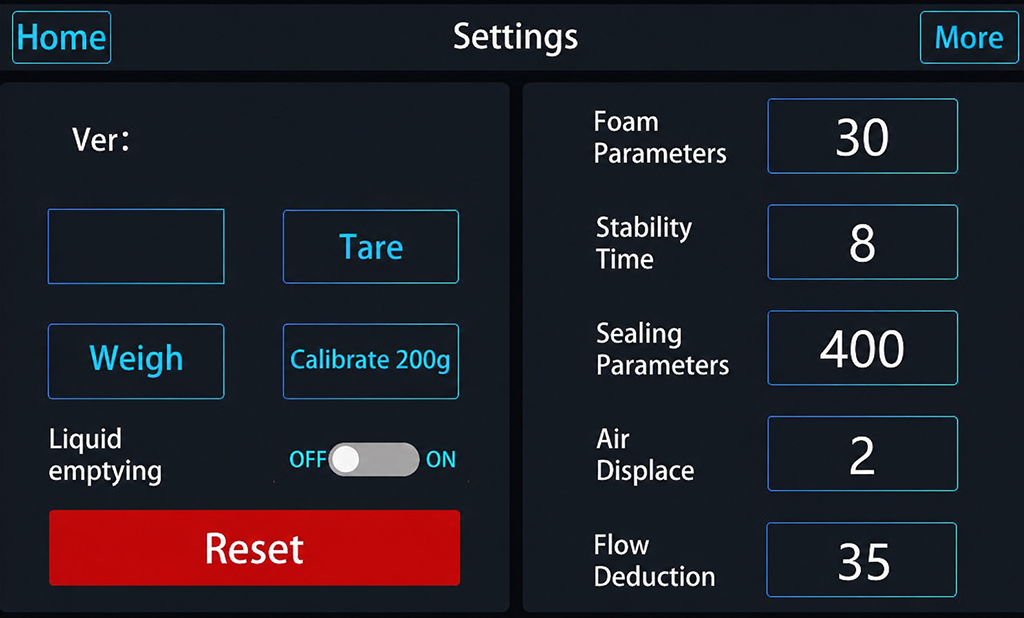
A CO₂ pressure of 0.18 MPa may serve as a reference under specific operating conditions, but it is not a universal setting for every beer and machine.
Different nozzles may also affect filling performance. For example, the 4010 nozzle can be evaluated for foam control, while the 5010 nozzle may be tested for filling speed under suitable conditions. The final choice should depend on the beer characteristics, machine configuration and actual test results.
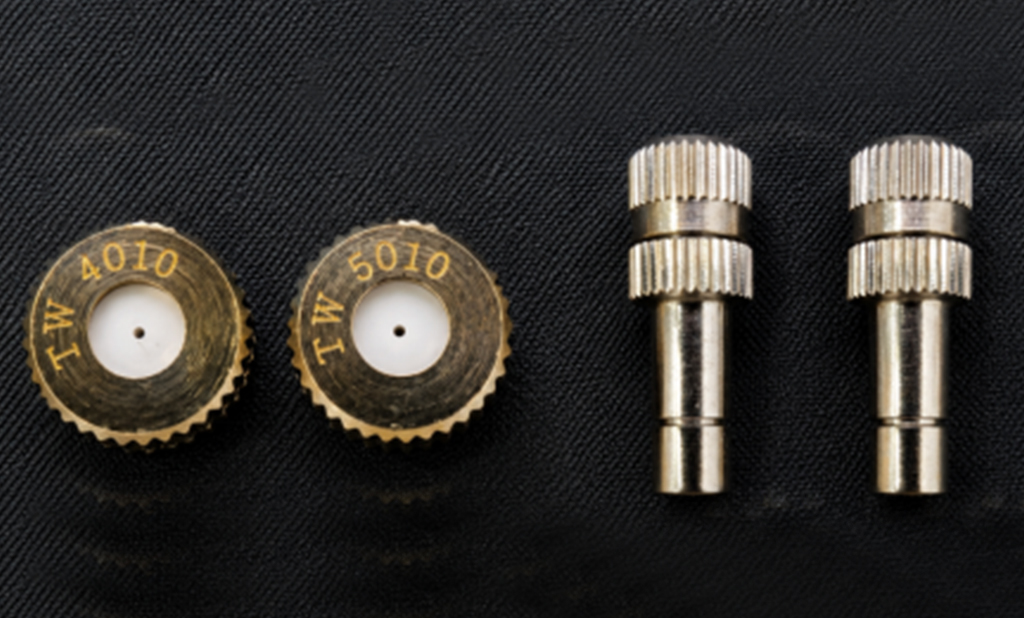
Adjustment tip: Change only one parameter at a time and observe the effects on foam, filling volume and seam quality. This makes it easier to identify the cause of any improvement or deterioration.
Part 4: Why Do Seamed Cans Feel Soft?
Soft cans after seaming may be related to internal pressure, CO₂ content, filling volume or seam quality.
Check the following:
- CO₂ Supply: Ensure a stable supply with a working pressure of 0.15–0.18 MPa, meeting the machine’s requirements.
- Filling volume: Check whether the actual filling volume meets the required level.
- Seam quality: Verify that the seaming equipment operates correctly and inspect seam quality according to the applicable standards.
- Condition after refrigeration: Temperature changes affect the amount of CO₂ dissolved in beer and can therefore influence internal pressure.
Can firmness alone cannot determine whether a seam is acceptable. If the problem persists, investigate the gas supply, filling and seaming stages.
Part 5: Why Is the Filling Speed Slower Than Expected?
Filling speed depends on more than the machine itself. Beer condition, gas supply, nozzle condition, piping and operating rhythm can all affect performance.
Check the following:
- Whether the CO₂ supply is stable.
- Whether the nozzle is blocked or needs cleaning.
- Whether the beer lines are too long or experience a significant temperature rise.
- Whether unnecessary waiting occurs between filling and seaming.
- Whether alarms, unexpected pauses or other operating issues affect the production cycle.
For some SDET equipment, a filling time of approximately 40–45 seconds per can and a seaming time of around 20 seconds can serve as references under specific operating conditions. Actual output depends on the machine model, can size, filling volume and coordination between operations. These figures should not be treated as guaranteed production rates.
Recording the filling and seaming times across several consecutive cans can help identify whether the issue is related to machine performance or the overall operating cycle.
Part 6: Exhaust Alarm During Cleaning
If the following alarm appears during cleaning:
- “Abnormal Pressure Relief and Exhaust, Check Nozzle or Solenoid Valve.”
First check whether the exhaust nozzle is blocked and whether the exhaust solenoid valve is operating correctly.
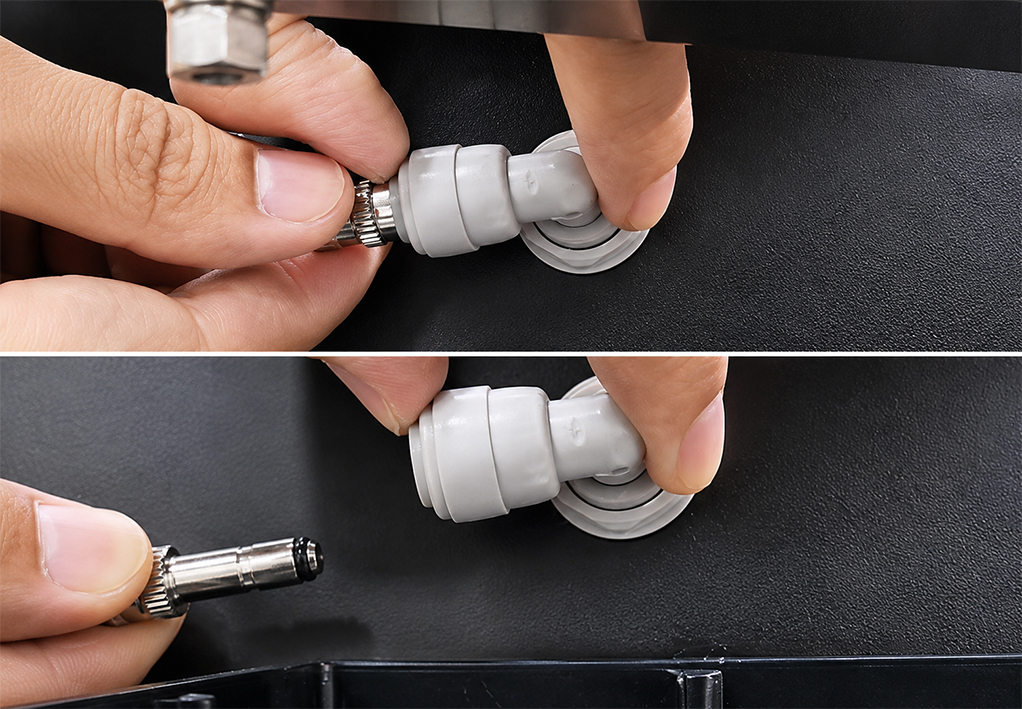
If the nozzle needs to be removed, stop the machine and ensure the system is safely depressurized before cleaning it according to the operating manual. If the alarm persists, inspect the exhaust passage and related components
Quick Troubleshooting Checklist
- Pressure does not return to zero: Check the exhaust nozzle, solenoid valve, exhaust passage and pressure sensor.
- Filling progress reaches 100% too early: Check the sensors, reset status and actual filling process.
- Excessive foam or underfilling: Check beer temperature, CO₂ pressure, nozzle, piping and machine settings.
- Soft cans after seaming: Check the gas supply, filling volume and seam quality.
- Reduced filling speed: Check the gas supply, nozzle, piping temperature, operating cycle and machine alarms.
- Cleaning alarm: Check the exhaust nozzle, solenoid valve and related passages.
Part 7: Conclusion
Consistent filling performance depends on the equipment, beer characteristics and operating procedures working together. Systematic checks and adjustments to one variable at a time can help identify the cause more efficiently.
If you are selecting a beer can filling machine or looking to improve an existing production line, contact SDET with your machine model, beer type, filling volume and details of the issue. Our team can help assess the situation and provide recommendations based on your equipment configuration.